Preload vs Preconnect vs Prefetch vs Prerender: What Should the Browser Do Early?
Use preload for a specific resource needed by the current page, preconnect for a critical cross-origin server you will contact soon, prefetch for a resource or document likely needed on a future navigation, and prerender only when a future page is very likely to be visited and safe to run before the user clicks. More hints do not automatically mean a faster site.
Level: Intermediate frontend development
Your hero image appears late, so you add preload. Your font comes from another domain, so you add preconnect. Then you prefetch every product page and prerender the checkout because both sound faster.
The first two might help. The last two might download pages nobody visits—or run code for a page the user never opens.
These techniques all give the browser a head start, but they do different work at different costs. The useful question is not “Which one is fastest?” It is “What do I know early enough to act on, and what happens if my prediction is wrong?” MDN: Speculative loading · web.dev: Resource hints
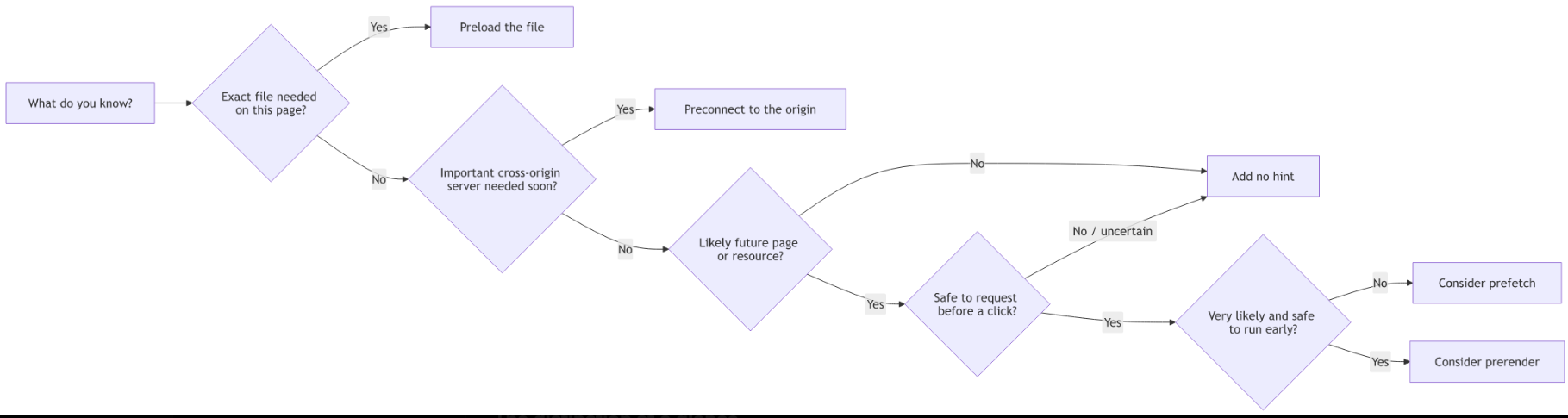
The distinction at a glance
| Technique | What starts early | You identify | Best fit |
|---|---|---|---|
| Preload | Fetching a specific resource | File URL and as type |
Late-discovered resource needed by the current page |
| Preconnect | Connection setup | Cross-origin server | An important connection needed soon |
| Prefetch | Speculative resource or document fetch | Resource or future-page URL | A likely future navigation |
| Prerender | Fetching, loading, and rendering a future page, including running its JavaScript | Future document URL or matching links | A high-confidence, safe future navigation |
Preload and preconnect help the page you are on. Prefetch and prerender prepare for where you might go next. Prerender is the most expensive—and the easiest to misuse—because the future page can execute before it becomes visible. MDN: Speculation Rules API
1. Preload: “This page needs this file—fetch it early”
A browser discovers resources as it parses HTML, stylesheets, and scripts. A hero image declared inside an external CSS file is not discovered until that CSS has been fetched and examined. A font declared in @font-face can have the same delay. Preload moves discovery earlier by identifying the file in the document’s <head>. It fetches the resource; it does not apply CSS, execute a script, or display an image by itself. MDN: rel="preload" · web.dev: Preload critical assets
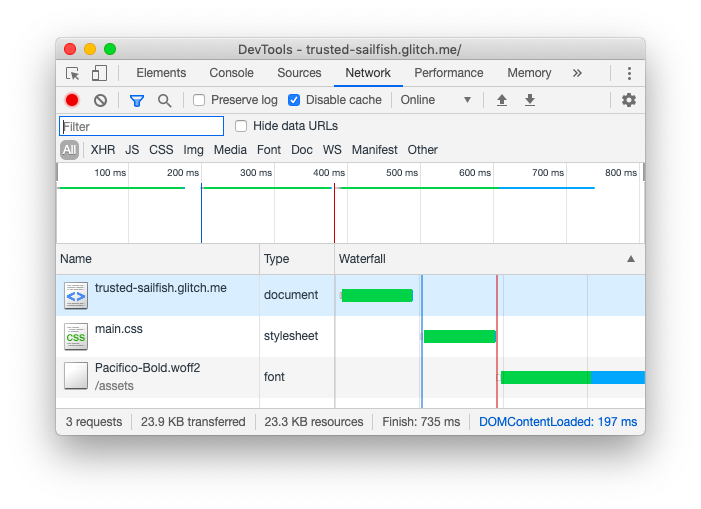
Source: web.dev, “Preload critical assets” — a font referenced inside CSS is discovered after the stylesheet.
Example: a CSS hero background
Suppose your stylesheet contains:
/* styles.css */
.hero {
  background-image: url("/images/hero.webp");
  background-size: cover;
}
The HTML can declare that exact image earlier:
<head>
  <!-- This page's hero image is otherwise hidden inside CSS. -->
  <link
    rel="preload"
    href="/images/hero.webp"
    as="image"
    type="image/webp"
    fetchpriority="high"
  />

  <link rel="stylesheet" href="/styles.css" />
</head>
href identifies the file. as="image" identifies the request type. fetchpriority="high" signals that this image is important: preloading an image does not automatically give it high image-fetch priority. The CSS rule still does the displaying. MDN: rel="preload" · web.dev: Resource hints
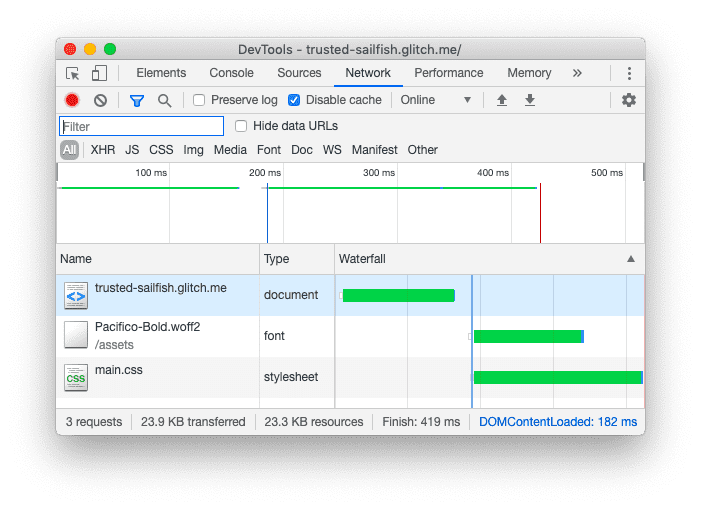
Source: web.dev, “Preload critical assets” — earlier discovery can let a critical resource load alongside its stylesheet.
💡 First try simpler HTML: If a hero is already a regular
<img>in the initial HTML response, the browser can discover it early. Prefer that markup, and considerfetchpriority="high"on the image itself, before adding another hint that could drift out of sync with its URL. web.dev: Effective Core Web Vitals improvements · web.dev: Preload responsive images
Example: a critical font
For fonts, the preload’s request mode must match the eventual font fetch. Include crossorigin even for a font hosted on your own origin.
<head>
  <!-- Only preload a font the current page actually uses soon. -->
  <link
    rel="preload"
    href="/fonts/site-regular.woff2"
    as="font"
    type="font/woff2"
    crossorigin
  />

  <link rel="stylesheet" href="/styles.css" />
</head>
/* styles.css */
@font-face {
  font-family: "Site Sans";
  src: url("/fonts/site-regular.woff2") format("woff2");
  font-display: swap;
}

body {
  font-family: "Site Sans", sans-serif;
}
Without a matching crossorigin setting, the browser can fetch the font again when CSS requests it. Preloading every weight and style is also counterproductive: those downloads compete with resources the page actually needs. MDN: Preloading CORS-enabled resources · web.dev: Resource hints
What if the hero image is responsive?
If a phone selects /hero-small.webp but the <head> preloads /hero-large.webp, the hint may waste data. Match the image selection with imagesrcset and imagesizes:
<head>
  <link
    rel="preload"
    as="image"
    imagesrcset="/images/hero-480.webp 480w,
                 /images/hero-960.webp 960w,
                 /images/hero-1440.webp 1440w"
    imagesizes="100vw"
    fetchpriority="high"
  />
</head>

<body>
  <img
    src="/images/hero-960.webp"
    srcset="/images/hero-480.webp 480w,
            /images/hero-960.webp 960w,
            /images/hero-1440.webp 1440w"
    sizes="100vw"
    width="960"
    height="540"
    alt="Product displayed in the page's hero section"
  />
</body>
The preload link deliberately has no href. Browsers without responsive-preload support will not start a potentially wrong fallback image request; the <img> still has its normal src. Only add this hint if the image would otherwise be discovered late. web.dev: Preload responsive images
Use preload when: you know the exact resource this page needs, but the browser would discover it too late.
2. Preconnect: “We will need this server—prepare the connection”
Before fetching from a new origin, the browser must perform connection work such as DNS resolution and a network handshake. preconnect asks it to do some or all of that work ahead of the first request. It does not download the font, image, or API response. MDN: rel="preconnect"

Source: web.dev, “Assist the browser with resource hints” — the connection setup a timely preconnect can move earlier.
Example: a known third-party font host
<head>
  <!-- The stylesheet and font files come from different origins. -->
  <link rel="preconnect" href="https://fonts.googleapis.com" />
  <link rel="preconnect" href="https://fonts.gstatic.com" crossorigin />

  <link
    rel="stylesheet"
    href="https://fonts.googleapis.com/css2?family=Roboto&display=swap"
  />
</head>
The font-host hint includes crossorigin because the font request uses anonymous CORS. Without a compatible connection, the preconnection might not be reusable for the font. web.dev: Resource hints
Preconnect is useful when you know the important origin but not the exact resource URL yet. If you know the specific late-discovered file required by the current page, ask whether a preload would address the delay more directly. web.dev: Preconnect and DNS prefetch
⚠️ Do not preconnect everywhere: Unused connections consume resources. Preconnect has little benefit for the same origin that served your HTML because that connection is already available. Reserve it for a small set of important cross-origin connections needed soon. MDN: Speculative loading
If you only need an early domain-name lookup, dns-prefetch is lighter:
<!-- Less work than establishing a full connection. -->
<link rel="dns-prefetch" href="https://analytics.example.com" />
Use preconnect when: an important cross-origin connection will be used soon enough to benefit from early setup.
3. Prefetch: “The next page may need this”
prefetch requests a resource speculatively for a future navigation. Unlike preload, it does not say the current page needs the resource. The browser can decide whether and when to make the request, and later reuse depends on browser behavior and caching. MDN: rel="prefetch"
Example: a likely next-page stylesheet
Suppose a product listing does not use the detail page’s stylesheet, but users often open a product next:
<head>
  <!-- Useful if the next page uses this asset; not applied here. -->
  <link rel="prefetch" href="/assets/product-detail.css" />
</head>
This can populate the HTTP cache for a later same-site page. It is not permission to prefetch every image, stylesheet, and link in the catalog. The user may never visit those pages, and some prefetched responses cannot be reused because of cache directives or partitioning. MDN: rel="prefetch"
As of October 2026, MDN marks <link rel="prefetch"> as having limited availability. Navigation must work correctly without it. It remains useful for future-page subresources; for a future document, consider Speculation Rules prefetch where supported. MDN: rel="prefetch" compatibility · MDN: Speculation Rules API
Example: prefetch a future document
<!-- Only nominate a page that is safe to request before a click. -->
<script type="speculationrules">
{
  "prefetch": [
    {
      "source": "list",
      "urls": ["/guides/getting-started"]
    }
  ]
}
</script>
In supporting browsers, this fetches the document response without running that page’s JavaScript or fetching all of its subresources. A normal navigation still works in browsers that ignore the rule. It is a different mechanism from <link rel="prefetch">, with different cache and navigation behavior. MDN: Speculation Rules API—Prefetching
Use prefetch when: a future resource or page is likely and requesting it early is safe and worth the potentially wasted bytes.
4. Prerender: “Prepare the next page before the user opens it”
Prerender goes beyond prefetch. In a supporting browser, it loads a future document in an invisible browsing context, fetches its subresources, and runs its JavaScript. If the user navigates there, the browser can activate that prepared page instead of starting from scratch. It may still be loading at activation; “near-instant” is a possibility, not a guarantee. MDN: Speculation Rules API—Prerendering

Example: a safe guide page the user is likely to open
<a class="safe-guide-link" href="/guides/getting-started">
  Read the getting-started guide
</a>

<script type="speculationrules">
{
  "prerender": [
    {
      "where": { "selector_matches": ".safe-guide-link" },
      "eagerness": "moderate"
    }
  ]
}
</script>
This document rule matches a specific link. moderate signals that the browser should wait for a reasonable sign of likely navigation rather than immediately preparing a long list of pages. Browser heuristics and resource limits still decide whether the prerender happens. The guide should be a safe, same-origin page with no unintended effects merely from loading it. MDN: Speculation-rule eagerness · MDN: Speculation Rules API
⚠️ Do not use
<link rel="prerender">as your implementation. The older link-based mechanism is deprecated and no longer does the modern full prerender its name suggests. Use Speculation Rules where supported. MDN: Speculative loading
The real risk: code runs before the click
Imagine prerendering a shopping cart while it is empty. The user then adds a product on the current page and opens the cart. If the hidden cart did not refresh, the activated page can show stale state. Similarly, loading a future page can trigger analytics or mutate browser storage before anyone actually visits it. Never prerender logout links, add-to-cart URLs, checkout actions, or pages with unreviewed load-time side effects. MDN: Unsafe prerendering · MDN: Server-rendered varying state
For page-view tracking or other work that should happen only after the page becomes visible, defer it until activation:
// Code on the destination page.
function onViewed() {
  recordPageView(); // Your app's page-view function.
  refreshUserState(); // Your app's current-state check, if needed.
}

if (document.prerendering) {
  document.addEventListener("prerenderingchange", onViewed, {
    once: true,
  });
} else {
  onViewed();
}
This is a pattern, not a complete fix for every page: audit server-side GET effects and other load-time JavaScript too. MDN also notes that some platform features are deferred or restricted during prerender. Prerendering is same-origin by default; cross-origin, same-site prerendering needs an explicit opt-in from the target, and cross-site prerendering is not available. MDN: Speculation Rules API—Detection and safety · MDN: Prerendering restrictions
As of October 2026, MDN marks the Speculation Rules API experimental and of limited availability. Treat prerender as a progressive enhancement, not a prerequisite for navigation. If your site uses Content Security Policy, its inline speculation rules also need to be allowed by the applicable script-src policy. MDN: Speculation Rules API
Use prerender when: a future document is very likely to be opened, it is safe to load and execute early, and the benefit justifies extra memory, CPU, and network work.
Why adding more hints can make things worse
A good hint removes waiting. A bad hint moves unnecessary work earlier.
Unused preload: Downloads a file this page never consumes, potentially competing with the actual hero. web.dev: Preload critical assets
Wrong preload request mode: A missing
crossoriginon a font preload can lead to another fetch. MDN: Preload and CORSToo many preconnects: Opens connections you may never use. MDN: Speculative loading
Overeager prefetch: Spends data on pages the user might not visit. MDN:
rel="prefetch"Unsafe prerender: Runs page code before the user visits and can display stale state on activation. MDN: Unsafe prerendering
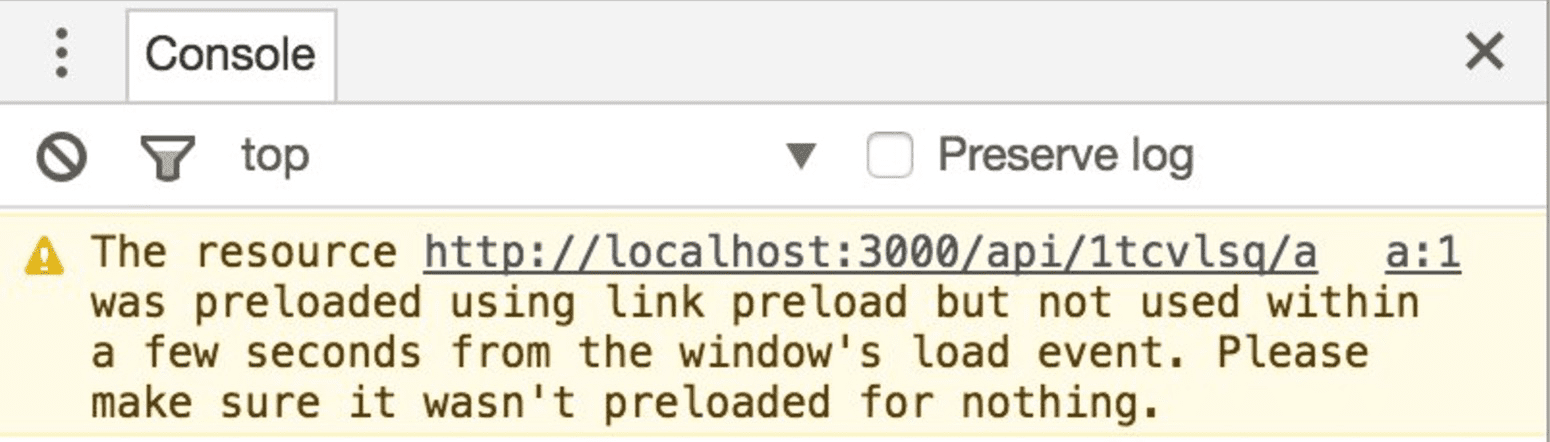
Source: web.dev, “Preload critical assets” — an unused-preload warning is a reason to inspect whether the resource was needed or whether its request failed to match.
🔥 Hot take: “Do it earlier” is not a performance strategy. If your prediction is wrong, you have merely moved wasted work into the critical part of the user journey.
A practical decision guide
When you spot a slow request or navigation, ask:
Is it a file needed right now? Make it discoverable in the current page’s initial HTML if possible; otherwise consider preload. web.dev
Is the delay mostly connecting to a new important origin? Consider preconnect. MDN
Is it for a probable next page, but not this one? Consider prefetch—
<link rel="prefetch">for a future subresource, or Speculation Rules for a future document where supported. MDNIs that next document both highly likely and safe to run early? Consider prerender through Speculation Rules. MDN
Not sure? Add no hint yet. Measure first.
How to verify that a hint helped
Compare behavior before and after your change in the browser’s Network and performance tools:
For preload, did the intended file start earlier and get reused instead of downloaded again?
For preconnect, did an important cross-origin request spend less time waiting on connection setup?
For prefetch, did a request happen, and was its response useful on the next navigation rather than discarded?
For prerender, did the browser actually prerender and activate the page? Did page-view tracking, application state, and other side effects remain correct?
For a hero optimization, check the user-facing Largest Contentful Paint (LCP) result, not only whether a waterfall bar moved left. For future-navigation work, test both a successful prediction and the case where the user visits somewhere else. Repeat under realistic network conditions; the browser can choose not to act on speculative hints. web.dev: Effective Core Web Vitals improvements · MDN: Speculation Rules API
Conclusion
Keep the job descriptions separate:
Preload the file this page needs.
Preconnect to the server this page will contact.
Prefetch what a later page will probably need.
Prerender a future page only when it is very likely and safe to run early.
Your next step: Find your page’s late-discovered LCP resource—or its most common slow navigation—in the Network panel. Add one targeted hint, verify the actual outcome, and remove it if the measurement does not justify the cost.