Web Workers vs Shared Workers vs Service Workers: A Practical Guide to Choosing the Right One
TL;DR: Choose a dedicated Web Worker for expensive work needed by one page, a Shared Worker for live coordination among same-origin tabs, and a Service Worker for request interception and offline behavior. They can work together, but none is a permanent background process or a substitute for persistent storage.
Reading time: ~13 minutes · Level: Intermediate JavaScript · Updated: October 2026
A page can freeze even though it uses a Service Worker. Two tabs can disagree even though each has a Web Worker. And an offline app can fail even though its Service Worker registered successfully.
The problem is treating worker as one job description. Each type has a different owner, communication model, and lifetime.
💡 The mental model: A dedicated worker is a private assistant for one caller. A Shared Worker is a coordinator for connected tabs. A Service Worker is an event-driven request handler for clients within its scope.
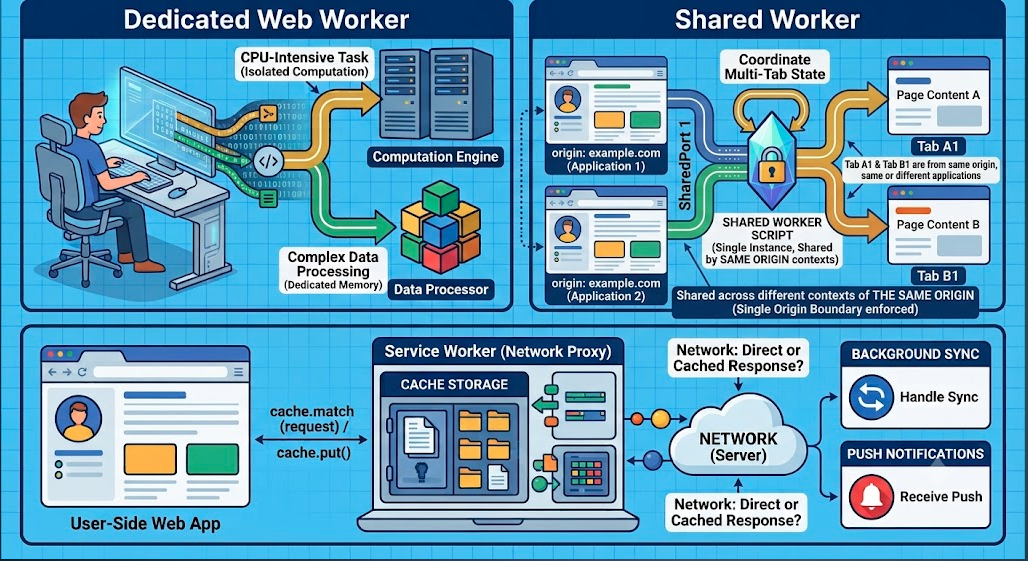
We will compare their communication patterns, lifecycles, and real-world use cases, then build a small example of each.
What all three have in common
Workers execute JavaScript outside the page’s main execution thread. They have their own global context, generally referenced as self, and cannot directly manipulate the page’s DOM. A worker that needs to change a button or display a result sends information to the page; the page performs the DOM update. MDN: Using Web Workers · MDN: Service Worker API
That separation is useful, but it is not free. Messages generally use structured cloning, which can cost time and memory for large payloads. Moving a small calculation to a worker might add overhead without improving the experience; moving a substantial calculation can keep the main thread available for interactions. MDN: Using Web Workers · web.dev: Web worker overview
The comparison at a glance
| Question | Dedicated Web Worker | Shared Worker | Service Worker |
|---|---|---|---|
| Primary job | Compute for one caller | Coordinate connected contexts | Handle events and controlled requests |
| Start with | new Worker(url) |
new SharedWorker(url) |
navigator.serviceWorker.register(url) |
| Typical connection | Creator ↔ worker | Each client ↔ its MessagePort |
Controlled client → fetch event |
| Multiple tabs share one instance? | ❌ Not by default | ✅ Eligible same-origin tabs can | ✅ One registration can serve multiple scoped clients |
| Intercept page requests? | ❌ | ❌ | ✅ For controlled clients |
| Direct DOM access? | ❌ | ❌ | ❌ |
| State survives all tabs closing? | ❌ | ❌ Do not rely on it | ❌ Global variables are not durable |
| Typical use | Image processing, parsing, simulation | One live connection feeding several tabs | Offline fallback, caching, push handling |
A Service Worker does not automatically intercept every request from an origin. Whether it handles a request depends on client control and scope; its fetch handler can also leave a request untouched. That distinction matters when debugging a first install. MDN: Using Service Workers · MDN: Fetch event
1. Dedicated Web Workers: protect one page’s responsiveness
Suppose a page calculates prime numbers while a user continues clicking and scrolling. A long synchronous calculation on the main thread delays those interactions. A dedicated worker runs the calculation separately and returns the answer in a message. web.dev: Web worker overview
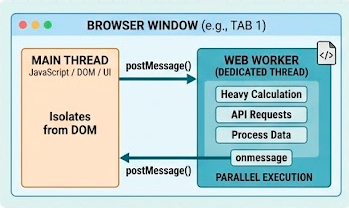
Example: calculate primes in a dedicated worker
Serve these files from a local development server. The page owns the UI; the worker owns the computation.
<!-- index.html -->
<input id="limit" type="number" min="2" value="2000000" />
<button id="calculate">Count primes</button>
<p id="result" role="status"></p>

<script src="./main.js"></script>
// main.js — page thread
const input = document.querySelector("#limit");
const button = document.querySelector("#calculate");
const result = document.querySelector("#result");
const worker = new Worker("./prime-worker.js");

button.addEventListener("click", () => {
  const limit = Number(input.value);

  if (!Number.isSafeInteger(limit) || limit < 2) {
    result.textContent = "Enter an integer of at least 2.";
    return;
  }

  button.disabled = true;
  result.textContent = "Calculating…";
  worker.postMessage({ limit });
});

worker.addEventListener("message", ({ data }) => {
  result.textContent = `Found ${data.count} primes up to ${data.limit}.`;
  button.disabled = false;
});

worker.addEventListener("error", (event) => {
  result.textContent = `Worker failed: ${event.message}`;
  button.disabled = false;
});
// prime-worker.js — dedicated worker
self.addEventListener("message", ({ data }) => {
  const { limit } = data;
  let count = 0;

  for (let candidate = 2; candidate <= limit; candidate++) {
    let isPrime = true;

    for (let divisor = 2; divisor * divisor <= candidate; divisor++) {
      if (candidate % divisor === 0) {
        isPrime = false;
        break;
      }
    }

    if (isPrime) count++;
  }

  self.postMessage({ limit, count });
});
The page calls worker.postMessage(). The worker receives a message event and replies with self.postMessage(). To stop an unneeded dedicated worker immediately, call worker.terminate(). MDN: Using Web Workers
When one worker handles several jobs
Raw messages are easy for one request, but what happens when several requests are in flight? Give each request an ID and return that ID with its result. Then the page can match responses to the right Promise. This is a messaging pattern, not a different worker type. MDN: Using Web Workers
// Page-side sketch: correlate concurrent requests.
let nextId = 0;
const pending = new Map();

worker.addEventListener("message", ({ data }) => {
  const request = pending.get(data.id);
  if (!request) return;

  pending.delete(data.id);
  data.error
    ? request.reject(new Error(data.error))
    : request.resolve(data.result);
});

function requestWorker(type, payload) {
  const id = ++nextId;

  return new Promise((resolve, reject) => {
    pending.set(id, { resolve, reject });

    try {
      worker.postMessage({ id, type, payload });
    } catch (error) {
      pending.delete(id);
      reject(error);
    }
  });
}
The matching worker must reply with { id, result } or { id, error }. In a real wrapper, also reject pending requests on worker failure or termination, and consider timeouts so a lost reply cannot leave a Promise pending forever.
Large payloads: copy or transfer?
For ordinary messages, structured cloning produces data in the receiving context. For a large ArrayBuffer, transfer ownership when the sender no longer needs it:
// Page thread
const buffer = new ArrayBuffer(1024 * 1024);
worker.postMessage({ type: "process", buffer }, [buffer]);

// The sender no longer owns the buffer after transfer.
console.log(buffer.byteLength); // 0
This avoids copying the buffer’s underlying data, but the page cannot keep using the transferred buffer unless the worker transfers it back. SharedArrayBuffer is a different mechanism: it enables actual shared memory and brings additional security and synchronization requirements. MDN: Transferable objects · MDN: Using Web Workers—Sharing data
Use a dedicated worker when: substantial work belongs to one caller and main-thread responsiveness matters.
2. Shared Workers: coordinate several open tabs
Imagine a dashboard open in three tabs. If each tab opens its own WebSocket, you may create duplicate connections and process the same updates three times. A Shared Worker offers a place to manage one connection for the currently connected tabs and fan out its messages. That is an architectural option—not a promise of “one connection per user” across devices, browser profiles, or every possible browsing context. MDN: SharedWorker
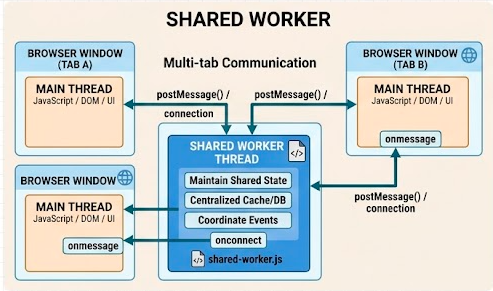
Example: live in-memory count across tabs
Open this page in two tabs of the same origin:
<!-- counter.html -->
<button id="increment">Increment</button>
<p id="count" role="status">Connecting…</p>
<script src="./counter.js"></script>
// counter.js — runs separately in each tab
const output = document.querySelector("#count");
const button = document.querySelector("#increment");

if ("SharedWorker" in window) {
  const worker = new SharedWorker("./counter-worker.js");
  const port = worker.port;

  port.addEventListener("message", ({ data }) => {
    if (data.type === "count") {
      output.textContent = `Shared count: ${data.value}`;
    }
  });

  port.start();
  button.addEventListener("click", () => {
    port.postMessage({ type: "increment" });
  });
} else {
  output.textContent = "Shared Workers are unavailable.";
  button.disabled = true;
}
// counter-worker.js — shared by connected tabs
let count = 0;
const ports = new Set();

self.addEventListener("connect", (event) => {
  const port = event.ports[0];
  ports.add(port);

  port.addEventListener("message", ({ data }) => {
    if (data.type === "disconnect") {
      ports.delete(port);
      port.close();
      return;
    }

    if (data.type !== "increment") return;

    count++;

    for (const client of ports) {
      client.postMessage({ type: "count", value: count });
    }
  });

  port.start();
  port.postMessage({ type: "count", value: count });
});
The tabs use worker.port.postMessage(), not worker.postMessage(). When listeners are registered with addEventListener("message", ...), start the port with port.start(); assigning port.onmessage starts it implicitly. MDN: Using Web Workers—Shared workers
This example keeps a set of ports to demonstrate broadcasting. In a production app, send the worker’s disconnect message and close the page-side port when appropriate, and handle reconnection after navigation or page restoration. Do not treat count as durable: Shared Workers normally shut down when no contexts reference them. MDN: Shared worker lifetime
Do you actually need a Shared Worker?
If your requirement is merely “tell my other tabs that a setting changed,” a BroadcastChannel may be simpler. It broadcasts messages among eligible contexts but does not, by itself, create one central process that owns a WebSocket or in-memory state. Browser storage partitioning can also affect which contexts communicate. MDN: Broadcast Channel API
As of October 2026, MDN labels SharedWorker Baseline 2026, newly available across current major browser versions, while warning that older browsers or particular features may differ. Feature-detect it if your audience includes older devices. MDN: SharedWorker compatibility
💡 Debugging tip: Worker logs may appear in a worker-specific inspector rather than the page console. MDN points to
chrome://inspect/#workersfor Chrome andabout:debugging#workersfor Firefox. MDN: SharedWorker
Use a Shared Worker when: multiple active, eligible contexts need one live coordinator—not merely because they need to exchange an occasional message.
3. Service Workers: respond to requests and browser events
A Service Worker is registered for an origin and path scope. Once active and controlling a client, it can receive fetch events and choose whether to return a network response, a cached response, or a generated one. It also participates in supported events such as push and background sync. Unlike a Shared Worker, it is not a continuously running coordinator: the browser can stop it between events and restart it later. MDN: Service Worker API · MDN: ServiceWorkerGlobalScope
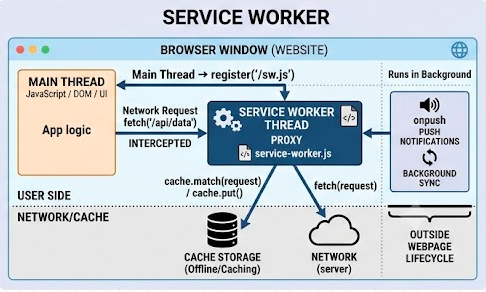
Example: an offline fallback page
For this example, serve /index.html, /app.js, /styles.css, /offline.html, and /sw.js at the root of the same origin. The named files must exist. Use HTTPS, or a browser-trusted localhost development origin. MDN: Using Service Workers
// app.js — page thread
if ("serviceWorker" in navigator) {
  navigator.serviceWorker.register("/sw.js", { scope: "/" })
    .catch((error) => {
      console.error("Service worker registration failed:", error);
    });
}
// sw.js — service worker
const CACHE_NAME = "offline-demo-v1";
const PRECACHE_URLS = ["/offline.html", "/app.js", "/styles.css"];

self.addEventListener("install", (event) => {
  // A failed precache rejects installation.
  event.waitUntil(
    caches.open(CACHE_NAME).then((cache) =>
      cache.addAll(PRECACHE_URLS)
    ),
  );
});

self.addEventListener("activate", (event) => {
  event.waitUntil(
    caches.keys().then((names) =>
      Promise.all(
        names
          .filter(
            (name) =>
              name.startsWith("offline-demo-") &&
              name !== CACHE_NAME,
          )
          .map((name) => caches.delete(name)),
      ),
    ),
  );
});

self.addEventListener("fetch", (event) => {
  const request = event.request;

  // Handle only same-origin page navigations in this small example.
  if (
    request.mode !== "navigate" ||
    new URL(request.url).origin !== self.location.origin
  ) {
    return;
  }

  event.respondWith(
    (async () => {
      try {
        return await fetch(request);
      } catch {
        return (
          (await caches.match("/offline.html")) ||
          new Response("You are offline.", {
            status: 503,
            headers: { "Content-Type": "text/plain" },
          })
        );
      }
    })(),
  );
});
This is a network-first navigation with a generic offline fallback. It does not silently cache every page. That narrower policy matters: blindly storing account pages or API responses can create privacy and stale-data problems. The cache clean-up also deletes only this example’s cache names rather than every cache on the origin. MDN: Caching
Choose a cache strategy per resource
Your caching strategy is a product decision, not a default for every route. Choose it according to how fresh each resource must be and what should happen offline. MDN: Caching
| Strategy | Response path | Potential fit | Main risk |
|---|---|---|---|
| Cache first | Cached response → network on miss | Versioned static assets | Serving stale assets if versions are mishandled |
| Network first | Network → cached fallback | Content where freshness matters | Slow responses on poor connections |
| Stale while revalidate | Cached response now; refresh for later | Content that tolerates temporary staleness | User sees old content until a later request |
| Cache only | Cached response or failure | Deliberately precached resources | A missing cache entry breaks the request |
| Network only | Always request network | Resources you intentionally do not cache | No offline response |
For example, a public article and a bank balance should not inherit the same caching rule merely because both are fetched with GET.
Why the first load—and updates—behave differently
A newly registered Service Worker downloads, installs, then activates. The page that initiated registration is usually not controlled on that first load; reload or navigate to test the ordinary controlled-page behavior. clients.claim() can adopt eligible existing clients when appropriate. MDN: Using Service Workers—Initial installation
When an updated worker installs, it can remain waiting while the previous version controls open pages. skipWaiting() requests earlier activation, but can make an existing page interact with a different worker version. Do not add skipWaiting() and clients.claim() reflexively to every example: decide how your app handles version transitions first. web.dev: The service worker lifecycle
What about offline submissions and push?
Service Workers can also participate in offline submissions and push notifications, with important qualifications:
Background Sync can ask a Service Worker to retry queued work when connectivity is suitable, but the API has limited browser availability. Persist the queue—for example, in IndexedDB—and design a fallback such as retrying when the app opens. Do not keep unsent form data only in a Service Worker global variable. MDN: Background Synchronization API · MDN: ServiceWorkerGlobalScope
Push notifications are browser-managed events, not evidence that your Service Worker stays awake continuously. Check platform support and permission requirements before promising the same notification behavior to every user. MDN: Service Worker API · MDN: Push API
Use a Service Worker when: you need deliberate request handling, offline behavior, or supported event-driven capabilities. Do not use it as a home for an unbounded computation loop.
Five mistakes worth avoiding
“I used a worker, so my UI cannot freeze.” The worker cannot prevent unrelated main-thread work from blocking the page; measure the actual bottleneck. web.dev
“Shared Worker means persistent shared storage.” Its in-memory state can disappear when it is no longer needed. Persist important data elsewhere. MDN
“My Service Worker registered, so it handles this page already.” Registration, activation, and client control are distinct. MDN
“A failed HTTP response will enter my
fetch()catch block.” An HTTP error such as404is still a response; checkresponse.okif your policy needs to treat it as failure. MDN: ServiceWorkerGlobalScope“Caching all GET requests is safe.” Choose routes and expiration behavior explicitly, especially for personalized content. MDN: Caching
The decision rule
Ask who owns the work:
One caller, expensive computation? Dedicated Web Worker.
Several open tabs, one live coordinator? Shared Worker.
Several tabs, only simple notifications between them? Consider
BroadcastChannelbefore introducing a coordinator.Controlled requests, offline responses, or supported background events? Service Worker.
Data that must survive tab or worker termination? Add persistent storage; none of these worker types provides that guarantee on its own.
You can combine them. An offline dashboard might use a Service Worker for navigation and assets, a Shared Worker for one live update stream across its open tabs, and a dedicated worker in a tab that performs expensive analysis. Each has one clear responsibility. MDN: Web Workers API · MDN: Service Worker API
Conclusion
The difference is not how “background” a worker sounds. It is who can reach it, what events it receives, and whether you can depend on its lifetime.
Try this next: Run the dedicated-worker example and interact with the page during calculation. Open the Shared Worker example in two tabs. Then install the Service Worker, reload, and test a navigation offline. Those three experiments reveal the architectural differences faster than another comparison table.